This article explains how to set up Veeam Backup for Microsoft 365 to protect only the most recent versions of Teams, OneDrive, and SharePoint files. This helps businesses reduce the risk of Microsoft 365 throttling, speed up backup processing, and use less storage. Exchange mailbox data is unaffected by this setting.
Note:
This is intended for Veeam Backup for Microsoft 365 customers who upgraded from a previous version or for Microsoft 365 tenants that were already protected before this default was implemented and may wish to adjust their current setup.
1.Ensure the environment is running at least Veeam Backup for Microsoft 365 v8.4.
2.Login to the Veeam Backup for Microsoft 365 management server.
3.Open Veeam Backup for Microsoft 365 Connect.
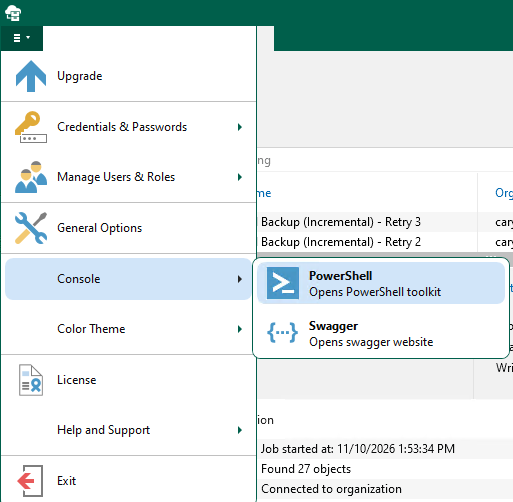
4.Expand Console from the main menu and select PowerShell.
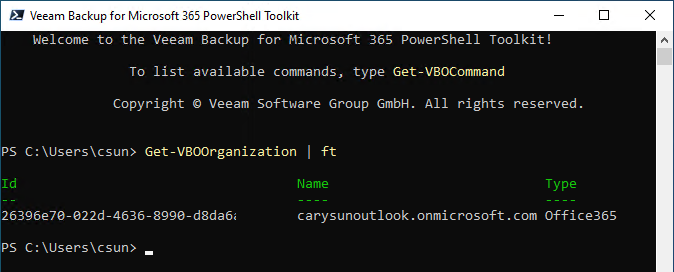
5.Run the cmdlet below to display all Microsoft organizations that are added to the Veeam Backup for Microsoft 365 infrastructure,
Get-VBOOrganization | ft
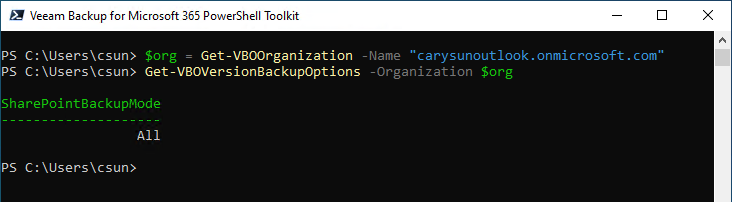
6.Run the command below to display the current Version Protection mode for a specific Organization.
$org = Get-VBOOrganization -Name "Your Organization Name"

Get-VBOVersionBackupOptions -Organization $org
7.Run the command below to set Protection to Latest Version Only.
Set-VBOVersionBackupOptions -Organization $org -SharePointBackupMode Latest

I hope you enjoy this post.
Cary Sun
X: @SifuSun
Web Site: carysun.com
Blog Site: checkyourlogs.net
Blog Site: gooddealmart.com
Amazon Author: Amazon.com/author/carysun

Author: Cary Sun
Cary Sun has a wealth of knowledge and expertise in data center and deployment solutions. As a Principal Consultant, he likely works closely with clients to help them design, implement, and manage their data center infrastructure and deployment strategies.
With his background in data center solutions, Cary Sun may have experience in server and storage virtualization, network design and optimization, backup and disaster recovery planning, and security and compliance management. He holds CISCO CERTIFIED INTERNETWORK EXPERT (CCIE No.4531) from 1999. Cary is also a Microsoft Most Valuable Professional (MVP), Microsoft Azure MVP, Veeam Vanguard and Cisco Champion. He is a published author with several titles, including blogs on Checkyourlogs.net, and the author of many books.
Cary is a very active blogger at checkyourlogs.net and is permanently available online for questions from the community. His passion for technology is contagious, improving everyone around him at what they do.
Blog site: https://www.checkyourlogs.net
Web site: https://carysun.com
Blog site: https://gooddealmart.com
Twitter: @SifuSun
in: https://www.linkedin.com/in/sifusun/
Amazon Author: https://Amazon.com/author/carysun